If you only scan the barcodes printed on product packaging, a 1D scanner may already do everything you need. But once QR codes, mobile membership cards, electronic coupons, or different barcode formats enter the workflow, the decision changes.
This is where many buyers get stuck when comparing a 1D vs. 2D barcode scanner. A 2D model can read more types of codes, but that does not automatically make it the right choice for every checkout counter or warehouse.
The practical way to choose is to look at what you scan today, where you scan it, and whether those requirements are likely to change.
1. How Does a 1D Barcode Scanner Work?
Traditional 1D barcodes store data in a row of vertical bars and spaces. UPC and EAN codes found on retail products are familiar examples, while Code 39 and Code 128 are also common in warehouses, logistics, and inventory management.
A 1D scanner reads the pattern across the width of the barcode and converts it into data that can be sent to a POS system, computer, or other terminal.
There are two common ways to do this: laser scanning and linear imaging.
Laser Scanning
A laser scanner projects a visible line across the barcode and reads the reflected light from the dark and light areas.
It is a mature and straightforward technology. For a supermarket checkout, small shop, or warehouse that deals almost entirely with standard printed 1D labels, a laser scanner can still be a sensible choice.
The important limitation is that a traditional laser scanner is built around linear barcodes. It is not intended to decode QR codes or other 2D symbols.
Linear Imaging
A linear imager also focuses on 1D barcodes, but instead of following a reflected laser beam, it captures a narrow image of the code and decodes that image.
In practice, the performance difference between individual scanners can be more important than the technology name itself. If your labels are often faded, scratched, or poorly printed, it is worth testing the actual scanner with real samples before placing a larger order.
2. How Does a 2D Barcode Scanner Work?
A 2D barcode scanner takes a different approach. Most modern 2D scanners use an area imager, which captures the barcode as an image and then decodes the information inside it.
This makes it possible to read two-dimensional symbols such as QR Code and Data Matrix, while most 2D scanners can also handle the common 1D codes used on product labels and cartons.
That wider compatibility is useful in environments where more than one type of barcode appears during the same transaction.
Think about a retail counter. The cashier may scan an EAN code from a product and, a few seconds later, scan a customer’s QR membership card from a phone. A suitable 2D scanner can handle both without changing devices.
Why Screen Scanning Matters
More barcode-based services now live on phones: loyalty cards, digital tickets, coupons, pickup codes, and payment-related applications are common examples.
If screen scanning is part of the job, a 2D imaging scanner should normally be considered from the beginning rather than added later as a separate device.
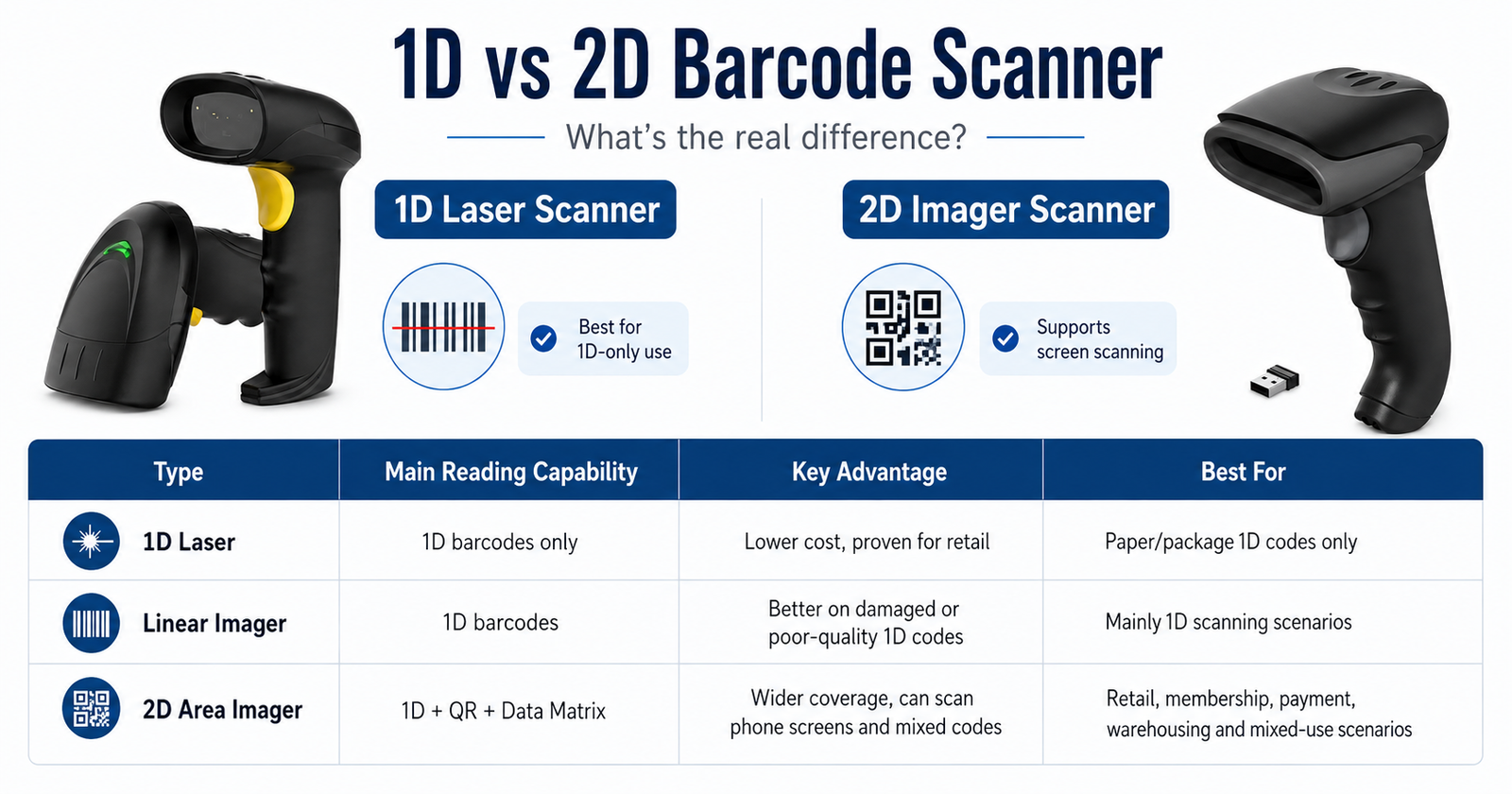
3. What Is the Real Difference Between 1D and 2D Scanners?
The obvious answer is barcode compatibility, but that is only part of the purchasing decision.
How the barcode is presented, whether workers need to align it carefully, and whether the scanner needs to deal with phone screens can matter just as much in daily use.
A useful rule: do not buy a 2D scanner simply because it sounds more advanced. Buy it when your application benefits from 2D codes, screen scanning, mixed barcode formats, or the extra flexibility of area imaging.
Barcode Types
A 1D scanner is the simpler option when the workflow is limited to linear codes such as UPC, EAN, Code 39, or Code 128.
A 2D imager covers a much wider range because it can normally read common 1D codes together with QR Code, Data Matrix, and other supported 2D formats.
Scanning Angle
With a laser scanner, the scan line needs to cross the 1D barcode correctly. This usually becomes second nature at a checkout counter, but it still requires some alignment.
An area imager captures a larger field instead of one narrow line, so operators generally have more freedom in how they present the barcode to the scanner.
Paper or Screen
If every barcode comes from a paper label or product package, this may not affect your decision very much.
If customers regularly present codes on smartphones, the ability to read screens becomes much more important. In that situation, a 2D imaging scanner is generally the safer choice.
Budget
For a simple application, there is nothing wrong with choosing the less expensive option. A business that only scans printed 1D product codes may see little benefit from paying for functions it never uses.
On the other hand, replacing scanners later because the business has introduced QR codes or mobile membership can cost more than choosing 2D from the start. This is why future requirements are worth considering alongside the initial purchase price.
How to Choose Between a 1D and 2D Barcode Scanner
Before comparing scan speed, resolution, wireless range, or battery capacity, answer one basic question: what will your staff actually scan?
A 1D Scanner Makes Sense When:
- Your system only uses standard 1D barcodes
- Codes are printed on labels or packaging
- The scanner stays at a fixed POS or desk
- You want to keep the hardware simple
- QR codes and phone screens are not required
A 2D Scanner Makes Sense When:
- QR Code or Data Matrix is already in use
- Customers present codes on their phones
- 1D and 2D codes appear in the same workflow
- You want easier scanning from different angles
- Your barcode requirements may expand later
For example, a small convenience store using only EAN product codes may be perfectly well served by a wired 1D scanner.
A shop that uses the same POS counter for product barcodes, digital coupons, and customer QR membership cards has a stronger reason to choose 2D.
Warehouses need another layer of consideration. Barcode format matters, but so does movement. If workers regularly leave the workstation to scan shelves, cartons, or pallets, wireless communication may have a bigger impact on productivity than the difference between two scanners with similar decoding specifications.
What Else Should You Check Before Buying?
Once you have settled the 1D-or-2D question, the specification sheet becomes much easier to read. At this stage, concentrate on the features that affect the actual installation.
Wired or Wireless?
USB is usually enough for a scanner that stays beside a POS terminal. It is simple, does not depend on a battery, and keeps the setup straightforward.
For stocktaking or warehouse work, 2.4G or Bluetooth can give operators more freedom to move. Check the quoted transmission range, but also think about walls, shelves, interference, and the layout of the actual workplace.
Reading Distance
Do not choose a scanner simply because its maximum reading distance is longer on paper.
A cashier normally scans at close range, while a warehouse operator may need to reach labels on cartons or shelves. Barcode size, density, print quality, and the scan engine all affect the usable distance.
Interfaces and System Compatibility
USB is common, but some installations still require RS232 or a specific wireless connection. Confirm this before ordering, especially when the scanner needs to connect to an existing POS machine, industrial terminal, or embedded system.
Battery and Storage
These specifications matter mainly for wireless models. If scanners are used throughout a full shift, battery runtime can have a direct effect on the workflow.
Offline storage can also be useful in places where a wireless connection is not always available, although the way stored data is uploaded should be checked before purchase.
Common Questions About 1D and 2D Scanners
Can a 1D Scanner Read a QR Code?
No. A standard 1D laser scanner or linear imager is designed for linear barcodes. QR Code is a two-dimensional format and requires a compatible 2D scanner.
Can a 2D Scanner Read Normal Product Barcodes?
In most cases, yes. Modern 2D imagers commonly support widely used 1D barcode formats as well as 2D codes. The exact supported symbologies should still be checked in the scanner specification.
Do I Need 2D If I Only Use 1D Barcodes Today?
Not necessarily. If the workflow is stable and there is no plan to introduce QR codes or screen scanning, a 1D model can still be the more economical choice.
If you expect the application to change, compare the cost difference with the inconvenience of replacing scanners later.
So, Should You Buy a 1D or 2D Barcode Scanner?
Start with the barcode, not the scanner specification.
If the job is limited to printed 1D codes, a good 1D scanner can be simple, reliable, and cost-effective. There is no need to pay for functions that the business will never use.
If QR codes, phone screens, or several barcode formats are already part of the workflow, a 2D imager is the more flexible option. It is also worth considering when those requirements are likely to appear in the near future.
After that decision, compare connectivity, reading distance, battery life, compatibility, and the conditions in which the scanner will actually be used. Those details often make a bigger difference in day-to-day use than a long list of specifications.
In short: choose 1D for a stable, print-only linear barcode workflow. Choose 2D when you need QR codes, screen scanning, mixed barcode formats, or more room for future changes.